Compare & Order Numbers (opens in a new tab)
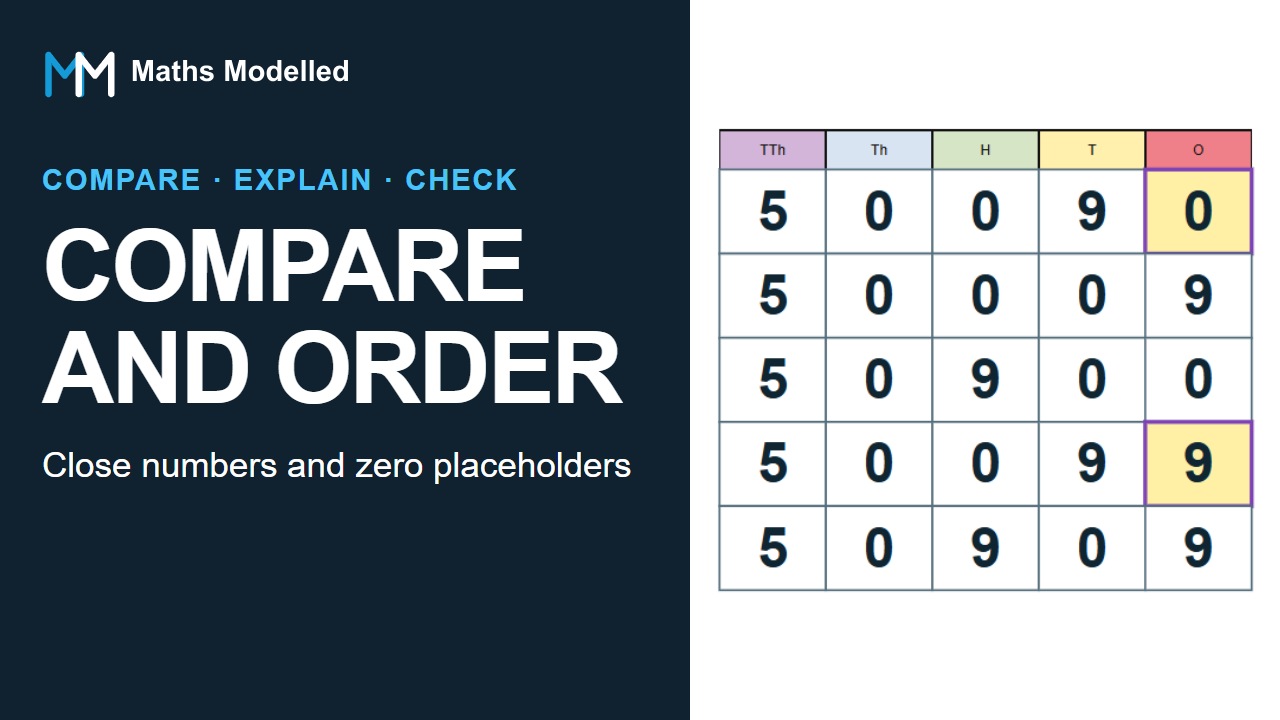
In Settings, choose Order 3–5 numbers, 5 numbers and Descending. Enter 50,090, 50,009, 50,900, 50,099 and 50,909, then apply the settings and explain the closest pair.
Open the tool (opens in a new tab) © 2026 Maths Modelled
Year 5 · Place value · 2:15 · Short worked example
Order five closely related numbers by comparing matching place-value columns, including columns with a zero digit.
The player connects to YouTube only when you choose to load it. YouTube may then process viewing data. Captions and playback speed are available in the player.
Use the same idea in a free tool or continue into the teaching lesson. Resources open in a new tab so you can keep your place in the video.
In Settings, choose Order 3–5 numbers, 5 numbers and Descending. Enter 50,090, 50,009, 50,900, 50,099 and 50,909, then apply the settings and explain the closest pair.
Open the tool (opens in a new tab)Teach the concept step by step with the matching classroom lesson.
Open the lesson (opens in a new tab)